How I Unlocked 50% Off Copa Fares
I was trying to book a flight from Miami to Guatemala for December. Simple enough, right?
I pulled up Copa Airlines, punched in the dates, and saw the price: $407.25.

For a one-way economy seat? That felt steep. I knew Copa has a "Panama Stopover" program that often incentivizes you to visit Panama City on your way through, so I decided to get a little creative with how I searched.
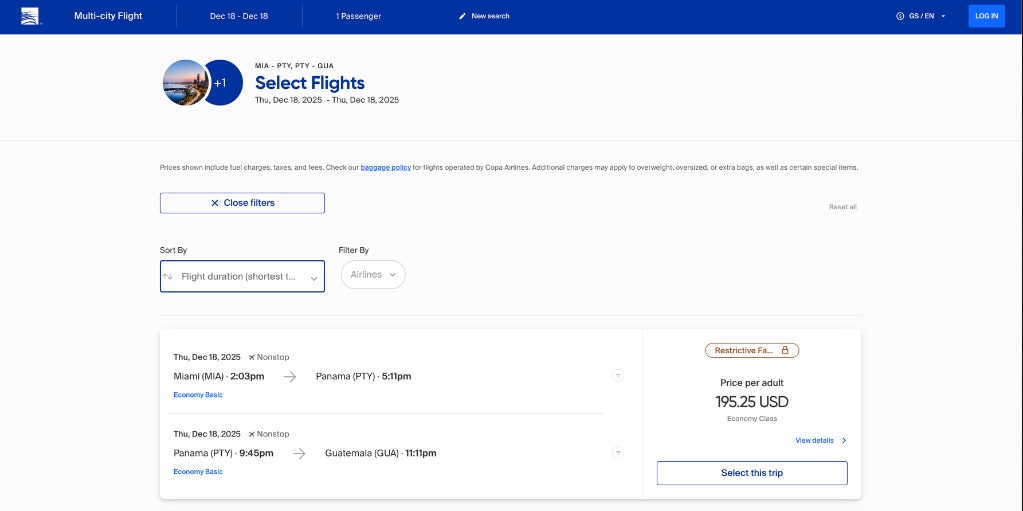
The result? I found the exact same flights for $195.25.
Here is how I found the fare and the workaround I used to book it.
The "Multi-City" Strategy
Most people search for "One Way" or "Round Trip." The algorithm sees you starting in Miami and ending in Guatemala, and it prices you for the convenience of a single ticket.
However, Copa’s system is designed to handle "Multi-City" bookings to encourage tourism in Panama. If you manually build the itinerary leg-by-leg, the pricing logic often changes—even if you aren't staying for a full 24 hours.
I broke the trip down:
- Flight 1: Miami (MIA) -> Panama (PTY)
- Flight 2: Panama (PTY) -> Guatemala (GUA)
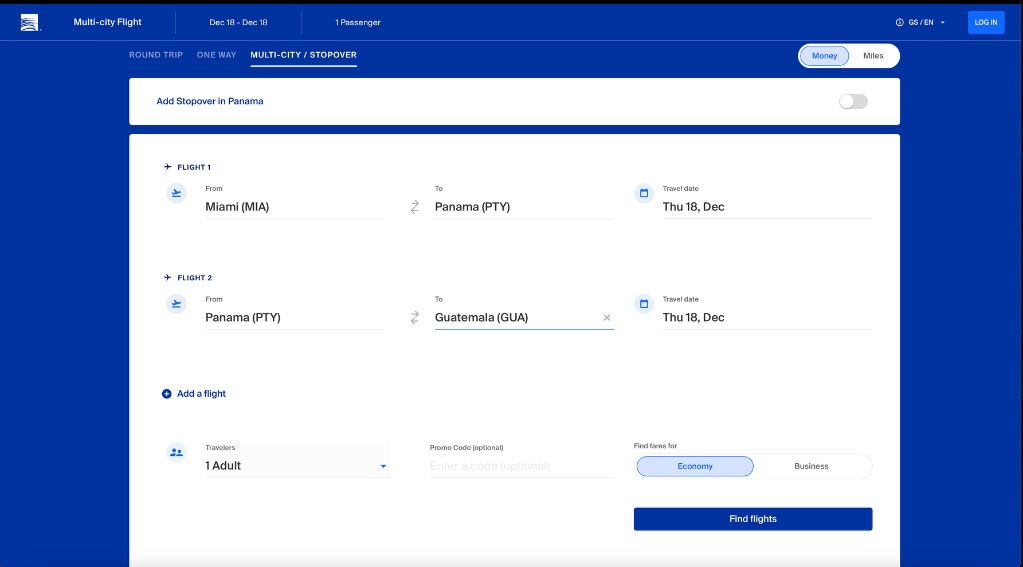
The Technical Hurdle: When you try to input this on the web interface for the same day, the site tries to be helpful. It assumes you just want a standard "One Way" ticket and redirects you back to the more expensive search interface.
The Workaround
Since the UI kept redirecting me, I skipped the form fields and went straight to the URL bar.
I realized that by manually adjusting the dates in the web address (the query parameters), I could ask the system to price out the "Multi-City" option for same-day travel without the UI overriding me.
I looked at the URL and simply changed the dates to match my travel day (2025-12-18 in my case).
The URL looked something like this:
.../multicity?roundtrip=false&adults=1&date1=2025-12-18&area1=MIA&area2=PTY&area3=PTY&area4=GUA...
The Result: The page loaded the multi-city pricing. Instead of $407, the total came out to $195.25. Same planes, same seat class, half the price.
How to Actually Book It
Here is the only snag: because the website isn't fully optimized for this specific search flow, the checkout page can sometimes error out.
The fix was simple and analog. I called them.
I got a Copa agent on the phone. I didn't have to explain anything complicated; I just gave them the specific flight numbers I had found on my screen:
- "I'd like to book flight CM 410 from Miami to Panama."
- "Then flight CM 182 from Panama to Guatemala."
Since their internal booking system allows them to build itineraries segment-by-segment just like the Multi-City search does, the agent built it exactly as I saw it. She quoted me the $195 price, I gave her my credit card, and it was done.
TL;DR
If you're flying Copa and the direct price looks high, try this:
- Don't search "One Way."
- Use "Multi-City" search for the stopover legs (e.g., MIA->PTY, PTY->GUA).
- Adjust the URL dates manually if the site tries to redirect you to the standard search.
- Note the flight numbers (e.g., CM 410) from the result page.
- Call Copa and have them book those specific segments for you.
Saved me over $200 for 15 minutes of digging. Safe travels!